Introducing Apple Messages for Business on Keiki
Your Keiki agent can now answer customers in Apple Messages for Business, under your verified name and logo, with Apple’s own pickers and your team one message away. Early access is open.
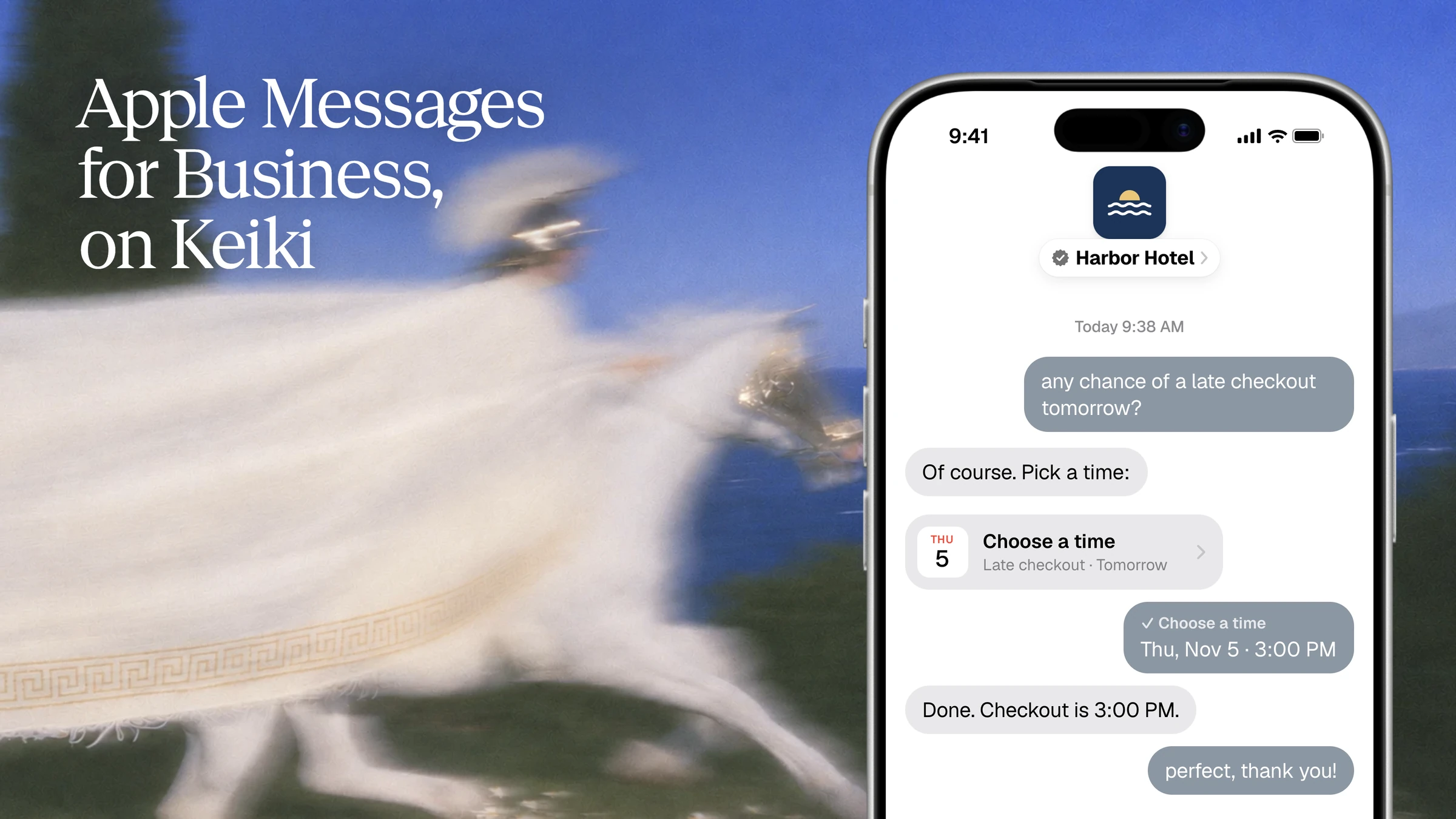
It's 9:38 on a Tuesday morning. A guest finds their hotel on Apple Maps, taps Message, and types the question they'd rather not call about: "any chance of a late checkout tomorrow?" The thread opens with the hotel's logo and a verified check next to its name. The answer arrives before they've put the phone down, with three checkout times they can tap. They pick one. Done.
That's Apple Messages for Business, and starting today it runs on Keiki. Your customer-facing agent can answer people in the Messages app under your verified name and logo, with Apple's own pickers in the thread and your team one message away. We're opening it in small groups, and the early access waitlist is open now.
What is Apple Messages for Business?
Apple Messages for Business (it used to be called Apple Business Chat) is Apple's channel for conversations between a business and its customers inside the Messages app. It isn't a regular iMessage number. Apple verifies your brand before you launch, customers see your name and logo instead of a phone number, and Apple keeps their number private unless they choose to share it.
Customers reach you from the places they already look: your listing in Apple Maps, the Message button next to your phone number when they search for you, and buttons or QR codes on your site and in your app. Nobody downloads anything, makes an account or saves a number.

If you're deciding between this and a regular iMessage line, Apple Messages for Business vs iMessage walks through the rules side by side. Keiki runs both, on the same agent, and Building iMessage Agents: The Complete Guide covers the rest of what goes into one.
What your customers get
- Your name, verified by Apple. The thread shows your logo and a verified check, so people know it's really you before they type a word.
- Taps, not typing. Choices arrive as Apple's list pickers, quick replies and time pickers. Booking a table, picking a size or choosing a checkout time is one tap.
- Answers in seconds, any hour. Your agent knows your menu, your policies and your systems, and it replies while the customer is still holding their phone.
- A person when they want one. Apple requires that typing "agent" or "help" reaches a human. On Keiki, that human is your team, taking over from Slack.
What your team gets
 Maya joined from Slack
- One agent, every channel. The agent that answers your iMessage line, SMS, WhatsApp and email now answers Apple Messages for Business too. Same prompt, same tools, same knowledge.
- Takeover from Slack. When a conversation needs a human, it shows up in Slack. Your teammate replies in the thread, the agent pauses, and it picks up again when they're done. See human-in-the-loop for iMessage agents.
- Apple's rules, handled. Customers start the conversation. When someone closes the chat, Keiki records it and holds every message until they write again. You stay inside Apple's guidelines without building any of it.
- Native pieces from the tools you already call. Keiki renders your agent's choices natively on each channel, so the same code works everywhere:
// One call. Apple Messages for Business shows a list picker or quick replies,
// iMessage shows a poll, Slack shows buttons.
ask_question({
  question: 'What can we help with?',
  options: ['Book a table', 'Change a booking', 'Hours and parking', 'Something else'],
})

// Apple Messages for Business only: Apple's native time picker.
// The customer's pick comes back as an ISO start time for your agent to book.
// Slots must be in the future, so swap in your own times.
offer_times({
  title: 'Late checkout',
  slots: [
    { start: '2026-11-05T13:00:00-05:00', duration_minutes: 30 },
    { start: '2026-11-05T15:00:00-05:00', duration_minutes: 30 },
  ],
})How to get Apple Messages for Business on Keiki
- Join the waitlist. Tell us about your business and what customers message you about on the Apple Messages for Business page.
- We set you up with Apple. When your spot opens, we register your brand through an Apple-approved messaging provider and take you through Apple's review. Apple's review usually takes a few weeks, and we handle the back and forth.
- Connect your agent. The channel appears in your agent's Channels, next to iMessage and SMS. Connect it, and your agent starts answering under your verified name.
Already on Keiki? You can also choose Request access on the Apple Messages for Business row in your agent's Channels settings.
Who it's for
Apple Messages for Business fits any business that customers come to with questions: hotels and restaurants, retail and e-commerce, home services, travel, banking and insurance. If people already call, email or DM you to book, change, track or ask, this is the front door where they'll find you.
It's less suited to agents that need to message people first, join group chats or run with no human behind them. For those, use a regular iMessage line, or run both: a verified inbound channel for customers who find you, and a number for reminders and follow-ups, on one agent.
Get early access
We're bringing teams on in small groups so every launch gets a person on our side, from Apple's review to your first conversation. Join the Apple Messages for Business waitlist, and we'll email you when your spot opens.
FAQ
Is Apple Messages for Business the same as iMessage? No. Both live in the Messages app, but Apple Messages for Business is a registered business channel: your brand is verified by Apple, customers see your name and logo rather than a number, and their own number stays hidden. A regular iMessage line is a phone number with no business program behind it.
Is Apple Messages for Business the same as Apple Business Chat? Yes. Apple renamed Business Chat to Apple Messages for Business. It's the same channel.
Can an AI agent answer on Apple Messages for Business? Yes, as long as people can reach a person. Apple requires the bot to say it's automated and a live agent to be available. On Keiki, your agent handles most conversations and your team takes over from Slack whenever a customer asks.
Can my agent message customers first? No. On Apple Messages for Business the customer starts the conversation. After that, your agent can send updates in their direct interest, like booking confirmations. If you need to message people first, add an iMessage line to the same agent.
How long does it take to go live? Apple's review usually takes a few weeks. Keiki handles the registration and review with you, and you can build and test your agent on iMessage while you wait.
What does it cost? Apple doesn't charge for Apple Messages for Business. Pricing on Keiki is shared when your early access spot opens. Talk to us if you need numbers sooner.